Future Reflections Fall 2014 PROGRAMS AND OPPORTUNITIES
#BRLCHAT: Free Professional Development from the Comfort of Your Home!
by Natalie Shaheen
Reprinted from Division of Visual Impairments Quarterly, Volume 58, Number 4.
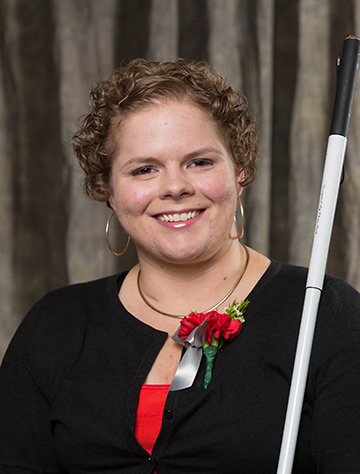 From the Editor: Natalie Shaheen has a background in special education and teaching blind children. She serves as director of education programs at the NFB Jernigan Institute.
If you're a teacher or orientation and mobility instructor, do you look forward to conferences, conventions, and other professional gatherings? Do you thrive on the energy, camaraderie, and intellectually stimulating conversations that occur when a group of passionate professionals comes together? Do you leave these gatherings wishing you had more opportunities to converse with your colleagues in the field of blindness from across the country and the world? By leveraging the power of the technology that is ever-present in our lives, we now can increase our access to these important learning opportunities throughout the year.
Over the past several years, educators and other professionals have begun to utilize social networks and other web services to create community-driven, dynamic, and free professional development opportunities for themselves. One popular vehicle for facilitating these professional learning opportunities is the Twitter chat. In the field of education, there are Twitter chats for special educators, kindergarten teachers, social studies teachers, first-year teachers, principals, and more.
A Twitter chat is an online conversation organized by a community around a topic important to its members. As you may have deduced, these chats take place on the social networking site called Twitter. Each conversation generally lasts an hour. The frequency with which these conversations occur depends on the needs and desires of the community.
Why?
Why would a group of professionals want to have a conversation about their work on a social networking site? Couldn't those conversations be carried out through email lists, phone calls, or in-person conversations? And why use Twitter as opposed to more popular networks such as Facebook?
Twitter's greatest asset is that it is public—a characteristic you may previously have seen as a disadvantage. One of the greatest challenges we face in the field of blindness is the lack of information the general public has about the work that we do and about the needs of the children and adults we serve. The public forum of Twitter affords us the opportunity to learn from our colleagues around the country while simultaneously raising awareness and educating the public. Furthermore, we can engage professionals outside of our field in relevant conversations. For example, if we are having a conversation about blind and low-vision students who have additional disabilities, it would be advantageous to involve special educators and related service professionals in the conversation. Through Twitter we can engage professionals in those fields, even if we are not personally connected to them.
Twitter is also free, searchable, accessible, archivable, quick, and hip! Anyone with an Internet connection and an average level of technology literacy can access Twitter. You can even access and search for information on Twitter without creating an account! Messages sent through Twitter are limited to 140 characters, so they take mere seconds to compose. As an added plus, students and young pre-service teachers, whom we hope to convince to pursue a career in our field, will think we are cool when we tell them we are tweeting!
What?
Established in August 2012 by a handful of teachers of the blind and visually impaired, #BrlChat is a Twitter chat for professionals in the field of blindness. The community has grown steadily and now includes people from around the world. In addition to teachers, the community consists of university faculty, pre-service teachers, blind students, parents, rehabilitation counselors, librarians, and blind and low-vision adults.
During this school year, the community voted to have the chats on the third Wednesday of each month at 9 p.m. Eastern Time. Members of the community generate topic ideas that are posted in a monthly topic poll. The topic that wins the most votes drives the next conversation. Previous #BrlChat topics have included:
- Collaborating with regular education teachers and other members of a child's education team
- Unified English Braille code (UEBC)
- Working with students who are English language learners (ELL)
- What our students want us to know: a conversation with blind students from across the country
- Teaching the Expanded Core Curriculum (ECC)
Each conversation is archived as an Excel file and posted on the #BrlChat webpage at <http://goo.gl/S45l0l>. It can be accessed at any time by anyone who is interested.
How?
To participate in the conversations, all you have to do is sign up for Twitter and be online at 9 p.m. eastern time on the third Wednesday of each month. Enter the hashtag "#BrlChat" into the search box, and you will see what others are saying. If you have something to add to the dialogue, include the hashtag #BrlChat in your tweet.
For those who are unfamiliar with Twitter, here is some helpful vocabulary:
Tweet: a message of 140 characters or fewer posted on Twitter. This is analogous to a status update on Facebook.
@Username: The way to refer to a person on Twitter in a tweet. This author's username is @nlshaheen.
Follower: Person who has agreed to receive your Tweets. If you choose to receive another Twitter user's tweets, you are following him or her. This is similar to the "friend" concept on Facebook.
@Mention: A public message directed to a specific Twitter user. You might tweet: "@nlshaheen what is tonight's #BrlChat topic?"
Retweet or RT: When one person on Twitter reposts something that was tweeted by someone else previously. For example, you might see a tweet from @nlshaheen that says: "RT @JohnDoe Braille rocks!" This means that first John Doe wrote, "Braille rocks!" When Natalie saw the tweet from John, she liked it so much she wanted to share it with her followers, so she retweeted John's message. This is the equivalent of a "like" on Facebook or a "+1" on Google+.
Hashtag: A way for people to categorize or label a tweet. If you use Gmail, you are likely familiar with the concept of "tagging." A single tweet can contain multiple hashtags. The hashtag for our Twitter chat is #BrlChat. The pound sign always precedes a hashtag.
If you are new to Twitter, you can find links to several helpful Twitter 101 guides on the #BrlChat webpage. If you read through the Twitter 101 guides and you still find yourself confused, contact me at [email protected] and I will be more than happy to give you a quick tutorial over the phone.
Be a Smart Digital Citizen
It is important for us to educate ourselves about the workings of the various web services we use. It is also important that we know the policies of our employers as they relate to social media. Many school districts have specific guidelines for their teachers that govern the use of social networking sites.
You should know that Twitter is public by default. That means that anything you tweet can be seen by anyone in the world. If you wanted to see everything @nlshaheen ever tweeted, you could go to <www.twitter.com/nlshaheen>. Without even logging into the service, you can see everything I have posted. Keep this in mind when you compose messages.
There is a setting that will make your tweets "private," but there are two things to keep in mind regarding "private" tweets. First, if someone retweets one of your tweets and that person's tweets are public, your tweet is now public, too. Second, if you are using Twitter for professional purposes, as this article advocates, having public tweets makes networking easier.
Join the #BrlChat community next month on the third Wednesday at 9 p.m. for some fast-paced, free professional development from the comfort of your home! The conversations are open to anyone who is interested in participating; all opinions are welcome. The more diverse the chat participants are, the more interesting the conversations will be!
If you cannot attend the next Twitter chat, remember that you can always post your comments on Twitter beforehand or after the fact, and you can access the archive on the #BrlChat webpage.
Finally, if you have ideas for future chat topics or feedback about how the community operates, please send your thoughts to me on Twitter (@nlshaheen), by email at [email protected], or by leaving a comment on the #BrlChat webpage at <http://goo.gl/S45l0l>. Happy tweeting!
Media Share
