American Action Fund for Blind Children and Adults
Future Reflections Winter 2022 FUN AND GAMES
Board Games for Braille Readers: How to Retrofit Classic Games
by Erin Jepsen
From the Editor: When I was ten years old my grandfather adapted the board game Sorry so I could play it with my sighted friends and relatives. He added a wooden frame beneath the board and drilled a hole in each playing square. Flipped upside down, the game pieces fit neatly into the holes so they didn't move around when touched. The flat side of each piece was labeled with Dymo tape to indicate the color: b for blue, y for yellow, r for red, and g for green. More Dymo tape labeled the slides, and the cards were Brailled.
My grandfather's Sorry! game is one example of the countless ways that standard board games can be made accessible for blind players. In this article Erin Jepsen explains how she has adapted board games to ensure that everyone in her family can play.
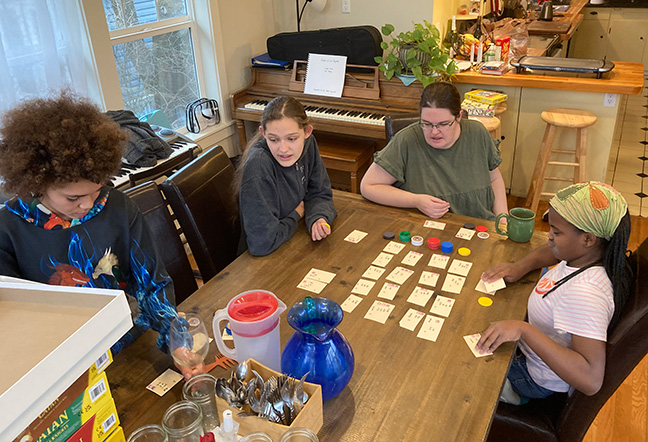
As my children have entered teenager hood, our family has discovered anew the joy of playing board games. Although the pandemic contributed a little to this hobby, we were never particularly out-and-about types to begin with. I'd say the pandemic just led to more of what we were already doing.
When we sit down to a game, of course everyone wants to be able to play, and just teaming up with a sighted player won't do at all. These games need to be fully accessible for everyone. I've spent years digging around on the internet to find accessible games, and when that resource was exhausted, retrofitting classic games myself. I have a wealth of tips and tricks to share!
Buying Accessible Games
Fortunately, many of the most common and well-loved games exist already in an accessible format. Some, such as Braille Monopoly and Braille Scrabble, are a little costly, but they are worth the expense! Of course, a deck of cards is a must-have, as well as card games such as Uno. Sets of chess and checkers with tactile boards can be found in several places; differences in the shape of the pieces allow players to distinguish white from black. Another fun find was a Rubik's Cube with tactile markings on each side. For teachers who have access to Quota Funds, APH (American Printing House for the Blind) offers tactile kits for retrofitting books and games.
Games That Are Naturally Accessible or Take Very Little Alteration
Some games don't need any adaptation. They can be played just as they are by both blind and sighted players. Mancala is one such game that our family enjoys. Another one the kids liked when they were younger was Trouble. We used a separate die, since the one inside the bubble can't be touched, and we found some household items to use as tokens, but the tactile board was great right out of the box. Some other games for younger kids include Hi Ho Cherry-O, Don't Break the Ice, Cootie, and Honeybee Tree. For older kids, wooden or metal brain teasers are almost all accessible by touch, and they're very challenging!
Games such as Unblock my Car or 15-Puzzle are also really popular at our house (with some Braille numbers added, of course!)
Retrofitting Games
 By nature, I'm a "maker," so I generally have piles of craft supplies lying around at any given time. Being familiar with the fabric stores and craft stores in town has come in handy. Several key elements of board games need to be addressed when retrofitting. These include information given by colors; information given by text; information on spatial areas, such as the game board; and playing pieces. I'll talk about each of these and give examples of games that have worked well for our family.
Information Given by Colors
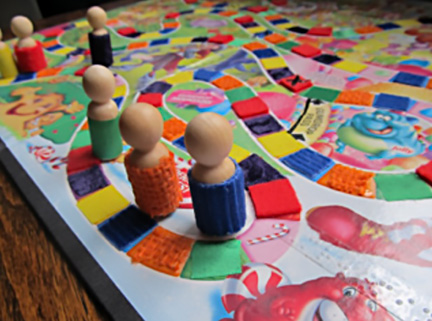
One of the first games I adapted was Candyland, which uses six different colors on cards, on the board, and on the tokens (or pawns or people or whatever you like to call them). For colors, it works well to choose different textures. Keep the textures the same color as the original item for the ease of the sighted players.
To adapt Candyland I used red fleece, orange burlap, yellow cotton, green satin, blue corduroy, and purple velvet. These fabrics all came from the fabric store. When I adapted Splendor years later, I used blue foam stickers, green plastic bumps, red corrugated cardboard, black construction paper, and yellow felt (white was left smooth). All these textures are available in the American Printing House Textures Kit. In some games colors aren't very important to game play, or they can simply be memorized after playing the game a few times. The color groups in Monopoly are a good example.
Information Given by Text
Hooray for Braille! There's one problem, though: Braille requires space, and most text on game boards is really small, to fit it all in. For this reason, we use a lot of abbreviations. For instance, in Settlers of Catan, we mark the development cards with a letter or two and have the full description written elsewhere. For the property cards in Monopoly (I never bought the fancy pro version), the vital information is the rent prices. If we need longer pages of info, a page Brailled on the Perkins is fine, such as for the building costs in Settlers of Catan.
The tools we have used most are the Perkins Brailler and a labeler. Personally, I like a slate and stylus and some clear Dymo label tape the best. You can also buy a handheld labeler that will work.
For labeling the development cards in Splendor that have a lot of information on them, I got some sheets of clear Braille labels. It worked great to write the Braille labels, cut them out, and stick them onto the cards. I Brailled the cards in The Great Dalmuti the same way. Using this method, no Braille shows through from the back of the cards, tempting sighted siblings to cheat!
I've also tried using other clear label stickers, such as the Avery labels that office supply stores sell. Although you can Braille them, they are lightweight and thin, which means that the Braille doesn't hold up very well after multiple readings. I have used colored card stock to make Braille labels quite successfully, gluing the labels on or taping them on with double-sided tape. A good source for tape, tactile stickers, and textured paper is the scrapbook section at a craft store.
Another method for reading text on games, especially rules or paragraphs of text, is to make use of a phone app. My favorite is Seeing AI. Seeing AI scans the text and reads it aloud or sends it to me in an email. Because I'm a Braille transcriber, and I have my own embosser, I can send the text document to my computer, transcribe it into Braille, and then emboss it in hard copy to go with the game. I know that a lot of families don't have this option, but they might be able to ask a teacher at school to do the embossing.
Game Boards
The playing board is the basis for play, and in our experience it's the trickiest part of the game for blind players to navigate. Sighted players may grow impatient when the blind player's hands are exploring the board. Blind players may have trouble locating information, or may accidentally cause game pieces to move. We have had varying degrees of success in retrofitting boards. With some games, it ends up being easier to leave the board alone and ask another player to move the pieces around. Obviously, this is a practical concession, but it's not true access, and it enables the other players to cheat, too! So although we have used this technique with games such as Sorry or Chutes and Ladders, it's far from ideal!
Some boards work well with pretty minimal tactile markings. On our own Monopoly board, a raised line between each property and a Braille abbreviation marking the name of each were enough. For Pente, which uses a simple grid, we substituted some raised-line graph paper and played inside the squares instead of on the corners. (We used small washers to replace one set of stones. More on tokens later.)
Some games, however, call for tactile game boards. This is especially true for games such as Carcassonne or Settlers of Catan, in which the tiles come together to form the playing board. For Carcassonne, I dug into my craft supplies and made tactile pieces: foam sticker cities, puffy paint roads, ribbon rivers and jewels for shield markers. I also put Velcro on the back of each tile and made a felt playing mat, so pieces would stay put when touched. I used the Velcro and felt mat technique for keeping Quirkle pieces in place, too.
For a game as complicated as Settlers of Catan, we went all fancy. My son 3D printed new tiles with raised symbols, a hollow place to hold the number chits (also 3D printed with Braille), and flat spots to hold the settlements, cities, and roads. He made some little resource tokens as well, to be exchanged for resource cards during play. Not every family has a lovely nerdy fifteen-year-old with a 3D printer like I do, but there are plenty of ways to use Braille labels and craft supplies to mark the Catan tiles. Tape, Velcro, or magnet can hold the chits in place.
Speaking of magnets, magnetic strips are easily available in craft stores. Braille labels on magnetic strips can be used to make wonderful, easily moveable words or numbers. Most paper-sized white boards are magnetic. If you're feeling adventurous, go to the building supply store and get a 9-inch flat tin shingle. I put masking tape around the edges, though, because they're a bit sharp. With magnets, I made a fridge poetry set that included our family names, pets, and favorite foods. I made a Yahtzee score card with removable numbers. I also made a math teaching board, but that probably doesn't belong here in a fun-and-games article, does it? Anyway, magnets are a handy way to hold moveable items in place long enough to read them tactually. They easily can be repositioned as needed.
Tokens
Many games use color to differentiate the pieces designated to each player. A quick and easy way to get around this problem and make the pieces tactile is to swap pieces out from different games. Another method we have used a lot is to find little objects around the house or buy them at a craft store or hardware store. We have used washers, bolts, nuts, wire nuts (for electrical wiring), pompoms, wooden blocks, M&Ms, uncooked pasta of various shapes, hardened Play-Doh, and math manipulatives—basically anything that's the right size and quantity.
I know this seems like a lot of information to throw at you. Remember, I haven't done all these projects at one time, but here and there over the years. Also, I like to craft and build. If that's not your wheelhouse, maybe you have a friend or a grandparent or a child who does enjoy making things. This article is meant to be a jumping-off point for thinking about access and making games accessible for all players, regardless of vision level. The main point is to think about including everyone in the fun!
Obviously, I can't mention every game out there, so if there's one you enjoy and want to retrofit, go for it! It's worth taking time for some gluing and Brailling to watch the whole family enjoying a game together. You might even show a newly blinded adult friend that he doesn't have to relinquish his favorite card games, as I did at a convention one time. Recreation and social time are fundamental needs, and blind players don't ever have to be excluded—not as long as there's some labeling tape nearby!
Note: All games and brand names of items are copyrighted, and no money was made from the mention of them.
Sources of Accessible Games
American Printing House for the Blind
http://aph.org
Braille Bookstore
http://www.braillebookstore.com/Toys-and-Games
Independent Living
https://independentliving.com/vision/games-education/
Tactile Rubik's Cube
https://amazon.com/dp/B07FDMRRBC
Labeling Materials
American Thermoform
https://americanthermoform.com/product-category/braille-labels/
Braille Labeler
http://www.braillebookstore.com/Handheld-Braille-Labeler.1
Labeling Tape
http://www.braillebookstore.com/Clear-Labeling-Tape.1