American Action Fund for Blind Children and Adults
Future Reflections Special Issue on Tactile Fluency INNOVATIONS
Tactile Fluency Through Interactive Tactile Graphics Worksheets
by Michael J. Coleman and Michael J. Rosen
From the Editor: Michael J. Coleman and Michael J. Rosen are cofounders and vice presidents of E.A.S.Y. LLC, a company based in Vermont. The company's mission is the production of affordable tactile drawing solutions for the blind and visually impaired.
One area of tactile fluency is having a facility with creating and reading tactile graphics. A skill central to tactile graphics fluency is freehand raised-line drawing using tools such as the E.A.S.Y. inTACT Sketchpad (http://www.easytactilegraphics.com), the APH Draftsman, or the Sensational Blackboard. With each of these tools, raised-line drawings are created on thin plastic sheets or sheets of ordinary paper. Raised lines are drawn on the sheets with a stylus or pen, analogous to drawing with a pencil on paper. (For a video of an eight-year-old child making a raised-line drawing and adding color with crayon pencils using a Sketchpad, visit https://www.youtube.com/watch?v=7SRCz-IUcno.)
Figure 1: Making a raised-line drawing of a house with the sun in the sky.
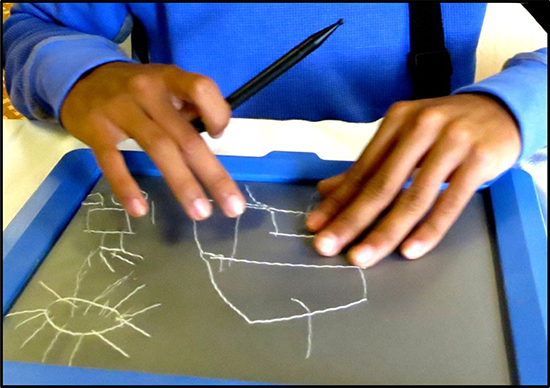 In this article, we make the case for the importance to blind people of developing manual freehand drawing or sketching skills. We discuss the work E.A.S.Y. has been doing to create tools and learning materials to help increase opportunities and raise expectations for the blind and visually impaired in developing such skills. In particular, E.A.S.Y. has developed interactive tactile graphics worksheets, or iTWs), which also could be called "read-write" tactile graphics. In addition, E.A.S.Y. has developed a special printer to produce these materials.
iTW's are school exercises or just-for-fun activities containing pre-printed raised-line graphical or pictorial information; freehand drawing is required to complete them. For example, think of connect-the-dots and mazes for young kids or plotting points on graph paper and geometry constructions for students in middle and high school.
It is important to distinguish between iTW's and "read-only" tactile graphics. You can touch and interpret the read-only drawings, but you cannot add to them or modify them in any way. Mass-produced ink-print worksheets for sighted students are ubiquitous in today's classrooms. Students are required to complete these worksheets by drawing, connecting dots, circling correct answers, or filling in squares. To date, none of these materials are accessible to blind and visually impaired students in a tactile format. No publicly available mass-produced accessible workbooks exist for blind and visually impaired (BVI) students.
E.A.S.Y. has been working closely with the National Federation of the Blind and other tactile-graphics advocates to develop the first tactile workbooks for BVI students. The work on iTW's and the printer was funded by NIH STTR Phase I and Phase II grants, the results of which are also described below.
Some Important Themes and Messages
Before we discuss the value of freehand drawing skills, here are some important take-away ideas to keep in mind. These ideas are central to E.A.S.Y.'s thinking and efforts to develop freehand drawing technology and learning materials to support the tactile fluency movement.
Drawing is a perceptual skill, not merely a visual skill. That is, we can develop a perception of the world around us through using all of our senses, and we can communicate that perception through drawing.
Anyone can learn to draw well and can make good use of this skill in school, at play, and at work.
Draw early and draw often! It's important for kids to learn to draw at a very young age.
It's not okay for kids to be told to skip graphics and drawing in school. Drawing is fun and useful!
We need "read-write" tactile graphics, not just "read-only" pre-prepared tactile graphics.
The Case for Freehand Raised-Line Drawing
Being able to express oneself graphically or pictorially—in the fundamental sense of using purposefully organized lines on paper to communicate information without words—is empowering. Freehand drawing is an ancient and ubiquitous form of nonverbal communication. It is nearly essential for expressing ideas, from the simplest to the most complicated, in any activity. In everyday life and in science, math, design, engineering, and art, drawing is for:
Depiction of what one perceives or imagines
Communication of ideas and information
Understanding a problem
Analysis and interpretation of data
Enhancement of the creative process
A tremendous wellspring of support for freehand drawing exists, including teachers and TVI's, parents, BVI educational leaders, the NFB, the Common Core (CC), and the Next Generation Science Standards (NGSS). In 2013 the NFB passed Resolution 2013-08 "Regarding Tactile Fluency" (see https://nfb.org/images/nfb/publications/bm/bm13/bm1308/bm130813.htm). One of the clauses states: "WHEREAS, competence in tactile graphics refers collectively to the techniques of drawing raised lines, circles, and other curves; developing the ability to feel and interpret a tactile image efficiently; developing an understanding of three-dimensional objects drawn in two dimensions; and, finally, appreciating inherently visual ideas of perspective and scale." Also, in NGSS, for example, in a section on engineering design, students are expected to be able to "develop a simple sketch, drawing, or physical model to illustrate how the shape of an object helps it function as needed to solve a given problem."
Examples of Interactive Graphics Worksheets
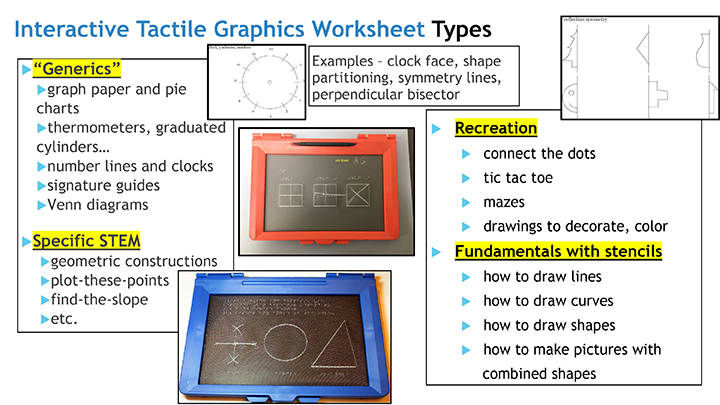
See Figure 2 for different types of Interactive Tactile Graphics Worksheets, from generics, to the STEM specific, to the recreational, to those designed for use with stencils.
Figure 2: Different Types of Interactive Tactile Graphics Worksheets: generics, STEM specific, recreational, and stencil-oriented.
See Figure 3 for a specific example of an Interactive Tactile Graphics Worksheet that was developed in collaboration with the Texas School for the Blind and Visually Impaired (TSBVI). It is a test question involving shapes and stencils. The question asks the students to feel the shape printed on the sheet, circle the correct shape name in the list printed below the shape, find the stencil of the same shape, and use the stencil to draw a copy to the right.
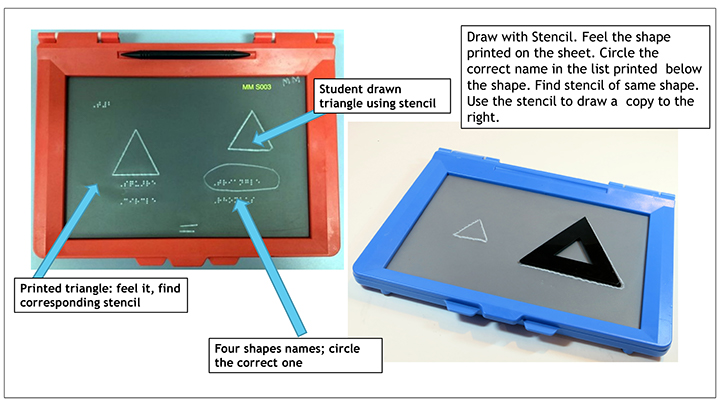
See Figure 4 for a student solution to the question depicted in Figure 3. It also shows one of the special stencils E.A.S.Y. developed for TSBVI at the request of the question TSBVI creator — the inside shape should match the outside shape and the width of the stencil should be at least 3/4" wide to make them easy for second-graders to hold on to.
Figure 3: Interactive Tactile Graphics Exercise developed in collaboration with TSBVI; Susan Osterhaus, Margaret Edwards (creator), John Rose.
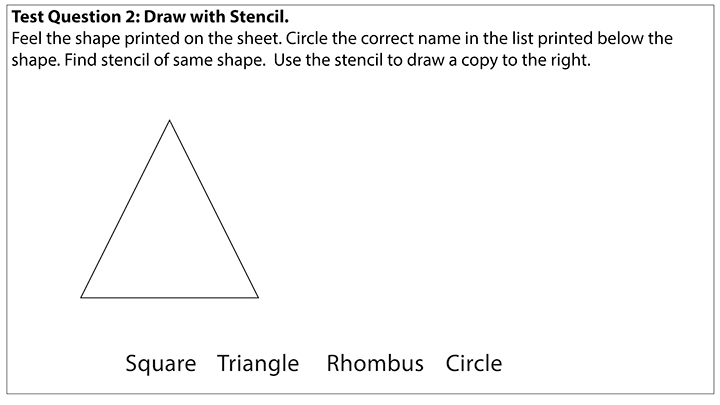
Figure 4: Student solution to the question in Figure 3. Also shown is one of the special stencils E.A.S.Y. developed for use with the exercise.
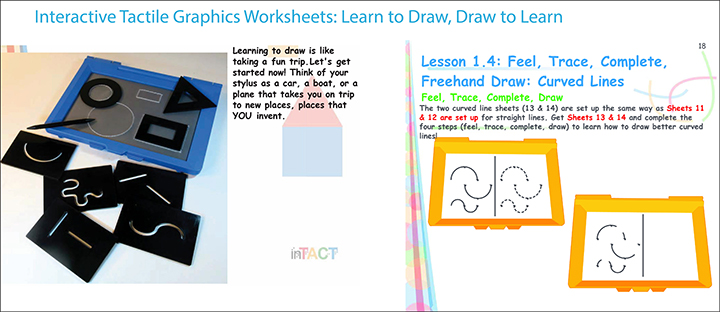
E.A.S.Y. has also developed a booklet for teaching kids how to draw entitled "Learn to Draw, Draw to Learn: How to Draw by Feel with Lines and Shapes! A Book about Learning to Make Raised-Line Drawings." (Henceforth, we refer to the booklet as LDDL.) See some sample pages from the booklet in Figure 5. It uses interactive tactile graphics exercises and stencils. The method we have chosen to introduce drawing starts with the typical basic building blocks of drawing, which are lines and shapes (such as circles, rectangles, and triangles).
Figure 5: Learn to draw using lines and shapes.
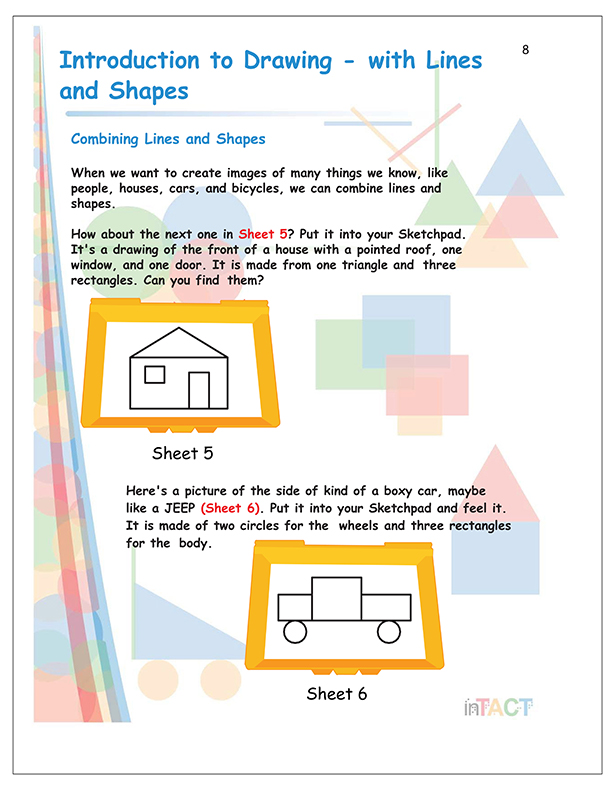
Once children learn what lines and shapes are and how to draw them, they can combine them in a variety of ways to create recognizable images of everyday things. A simple drawing of the front of a house, for example, can be composed of a triangle for the roof and rectangles of different sizes for the windows and door, as in the examples of Figure 6, which also show a simple drawing of a car.
Figure 6: Simple drawings of a house and car using rectangles, circles, and triangles.
E.A.S.Y. R&D Grant Activities and Accomplishments
From August 2016 through December 2018, E.A.S.Y. LLC, funded by a Phase II small-business grant from NIH, undertook a project with two goals: developing the inTACT Printer and evaluating the interactive tactile graphics (iTWs) it produces in cooperation with instructors at several educational sites for use by their blind and low-vision students.
inTACT Printer features and performance:
The beta prototype Printer developed under the grant is a desktop device with an 18-inch by 28-inch footprint. It weighs approximately twenty pounds. Blank tactile drawing sheets are manually inserted and retrieved once printed. Within the device, Brailling, sheet feed, and drawing processes are all automatic. The Printer's built-in Brailler provides tactile annotation. Lines are "scratch-embossed" by a stylus transported by an x-y mechanism in much the same manner as a human "draw-er" makes a graphic manually on an E.A.S.Y. Sketchpad, APH Draftsman, Sensational Blackboard, or related products. It produces an iTW from a selected digital graphics file prepared for this purpose.
To date, the time required to produce a completed iTW has ranged from twenty seconds to two minutes. The total time depends heavily on the amount of Braille that is involved. Brailling is noisier than scratch embossing, but the Printer is noticeably quieter than commercial Braillers. Raised lines up to 2mm in height and width can be produced. This line "prominence" is controlled from the computer file by adjustment of stylus down force.
Figure 7. Printer with blank sheet being inserted into Brailler stage
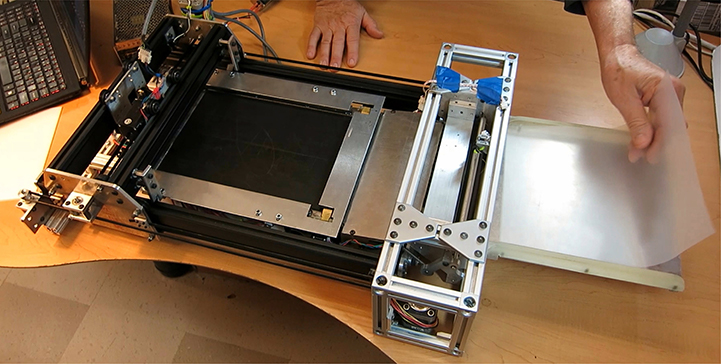
Figure 8. Printing of an iTW in progress
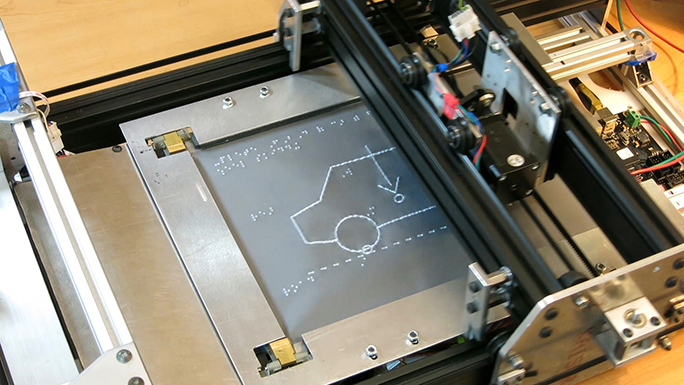
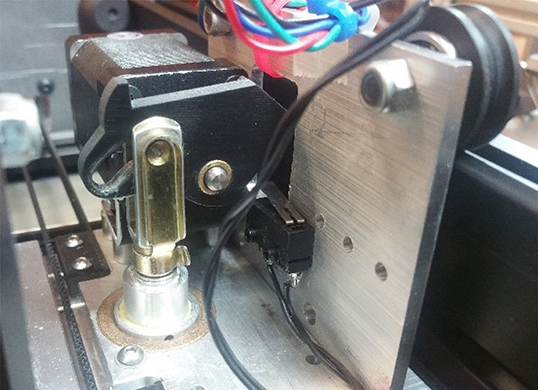
Figure 9. Detail of mechanism for raising and lowering the stylus and changing the down force.
iTW Evaluation
Working with TVI's and O&M specialists at collaborating schools and programs, the E.A.S.Y. team developed an initial library of 152 distinct iTW files. Survey data was gathered, gauging the reactions, difficulties, and successes of 116 students ranging in age from five to twenty-five years. The students' diversity of age, type, and history and extent of vision losses made statistical inference impossible.
Table 1 lists the sites and the curricular content of the iTWs evaluated at each location.
Site |
Number of iTWs |
Notes |
LA Center |
39 |
“Generics”, i.e. mixed content useful for multiple topics |
Curriculum-Specific: |
|
|
Texas School |
34 |
STEM, with 6 professionals and 37 students |
Perkins School |
14 |
Math and signature practice, with 4 professionals and 8 students |
LA Center |
8 |
Math and geometry, with 3 professionals and 3 students |
VT Assoc. for BVI |
6 |
STEM, with 5 professionals and 11 students |
LEAP (Learn, Earn and Prosper) Burlington, VT |
2 |
Dormitory map and stylized face, with 5 professionals and 8 students |
Four NFB BELL programs |
31 |
LDDL exercises, with 12 professionals and 49 students |
Unique Activity sheets |
18 |
Extra-curricular exercises developed during the grant project but not formally evaluated. |
TOTAL |
152 |
The evaluating professionals at the sites listed above collaborated with the E.A.S.Y. team to develop iTW files related to their particular needs. At the NFB BELL sites (Louisiana, Providence, Springfield, and Phoenix), the content consisted of the LDDL exercises. As iTWs were developed and sent to professionals for use and assessment, surveys were sent as Google Forms to profile these evaluators and collect their reactions.
Selected survey findings
- In response to questions requesting evaluators' attitudes regarding use of iTWs, these two answers were most common from the fourteen respondents to whom they were sent:
- Early development of tactile literacy is important for the education of blind/low-vision children, since fine-motor control development was observed to be a limiting factor in their use of iTWs.
- Competence with tactile graphics will be essential for these students in STEM courses.
- In response to multiple-choice questions, nine of ten responding NFB BELL instructors found students' use of interactive tactile graphics to be "very important" or "as important as Braille"; and six of eight TVIs responded that the iTWs they used allowed "a deeper understanding" than what would have been achieved with conventional materials.
- Reactions to details of the Sketchpad technology, drawing tools and iTWs revealed that varied prominence of raised lines (in keeping with their meaning) is important.
- Evaluators' "human factors" observations with the broadest implications for continued work included these:
- Hand strength of a young blind/low-vision user of iTWs (or any blind/low-vision user with motor impairment) can determine whether the student can form accurate and sufficiently prominent lines.
- Stencil-tracing exercises are effective for learning shapes and appreciating more abstract geometric concepts.
- Correct tactile perception of a shape printed on an iTW depends strongly on rendering it large enough to avoid confusion with the small-scale textures of the lines themselves.
Certain generalizations were possible from visual examination of iTWs completed by students, in particular these:
- Improved performance (in drawing skills) could be noticed between trials only weeks apart.
- Professionals and students improvised methods to make the use of iTWs easier for novice users, indicating their inventiveness as well as the need for iTW standards and conventions.
- Clear inter-student performance differences for particular iTWs were evident, indicating that evaluation of iTW-based exercises was not limited by ceiling or floor effects.
Regarding the evaluating professionals themselves, it was notable that, despite their affiliation with prominent institutions, prior experience teaching tactile drawing was rare. This is consistent with our observations outside the context of the grant project.
Summary Findings from Survey Responses
- Despite the need for ongoing improvements, interactive Tactile Worksheets were used, as intended, in real-world settings. Generally, they were welcomed by the students, posing no significant practical problems for the teachers.
- Evaluating professionals found that using iTWs had educational value beyond standard tactile teaching materials. In particular, learning spatial skills and concepts requires that a student must do more than touch the graphics; students must interact with them.
- While it was possible to observe participating students' performance improvement with iTWs, evaluators felt that introducing blind/low-vision children to interactive tactile graphics in the earliest school and pre-school years will be important for minimizing fine-motor development obstacles to their use.
- Many of the students enjoyed using the Sketchpad to execute iTWs, considering them to be recreational.
In conclusion, E.A.S.Y. is considering various models for making interactive tactile graphics content available through means such as "do-it-yourself interactive graphics worksheets" (create and edit digital graphics and print on site); "subscription services" (provide access to a digital library of worksheet files); and "student-ready hard copy" (provide packages of printed interactive tactile graphics worksheets coordinated with various curricula).
To learn more about the work of E.A.S.Y. LLC, visit the company's website at www.easytactilegraphics.com.
Media Share
