American Action Fund for Blind Children and Adults
Future Reflections Special Issue on Technology GETTING STARTED
The Knowledge of the Past and the Promise of the Future: Integrating Assistive and Mainstream Technologies into the Classroom Setting
by Isaac Raske
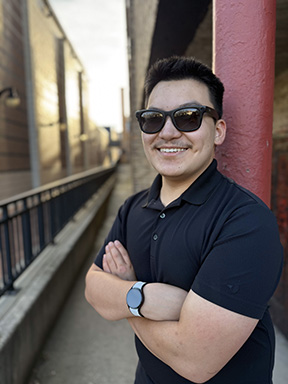 From the Editor: Isaac Raske is a high school senior from Wheaton, Illinois. In the fall he will be a freshman at Purdue University Polytechnic Institute, where he plans to major in cyber security. In this article he reflects upon his experiences with technology in the classroom and suggests ways for teachers to help blind and low-vision students develop their skills in order to flourish now and in the future.
My experiences using assistive technology in and out of the classroom have been positive overall. I have had a steady support system through my itinerant TVI (teacher of the visually impaired) and my orientation and mobility specialist. They have always been at the forefront of technological advances, allowing me to experience and try out several solutions for productivity, leisure, and independent navigation. I am really into assistive technology, and I would not be so excited about this field without the enthusiasm of my support team.
Special Tech in a Low-Vision Setting
Until fourth grade I attended a program for blind and low-vision students within a larger public school. I learned to read and write Braille and to use a standard laptop for basic word processing. In the third grade, I was introduced to the world of assistive technology with the BrailleNote Apex. I found it fascinating to use the electronic Braille display and keyboard, and I used the device for everything. I completed homework on it, recorded notes on it, and, best of all, played text-based adventure games such as Colossal Caves Adventure.
This revolutionary device helped me improve my Braille reading and writing skills, and I had access to everything I needed. Best of all, if something went wrong, I could always rely on my teachers to help me. They were trained in BrailleNote operations, and they usually knew how to troubleshoot. The Apex was my first exposure to technologies made by and for blind people, and it forever changed the way I view the world.
One major issue I had to put up with, though, was that my teachers in elementary school did not encourage me to explore on my own. I was always terrified to touch the mysterious Utilities Menu, Internet Explorer, Terminal for Screen Reader, and several other basic functions. At the time it made sense for the teachers to show me only specific functions. For many students it can be overwhelming when teachers demonstrate everything a device for the blind can do. However, looking back, I wish I had been pushed to be curious and to teach myself how best to use the technologies I had access to. Had I been given this opportunity, I believe I would have felt more confident on my technological journey.
Some Tips for Tech Teachers
While it is important to offer a student guidance, especially with a new device, it is also imperative to let students find out by themselves how things work. Even if they do not become tech-obsessed learners like I did, the ability to learn independently is and will be an important skill for a student’s future.
Tech Teacher Tip Number 1: Let students explore and learn on their own. Put limitations where they are appropriate, but keep in mind that self-guided learning boosts confidence and competence with technology usage.
A Change in the Winds
In fourth grade I transferred from the program for visually-impaired students to my local elementary school in search of higher-level math and science content. It was a struggle for me to fit in, and I had difficulty meeting and socializing with other students. Nobody else was blind, and I had to adjust to a classroom with up to twenty-five students instead of five or six. With this change, I left behind everything and everyone I knew at my old school.
One thing that I did not leave behind was my trusty old Apex. I was still able to do everything I needed to do in class, and I was still able to play those all-important games. However, this state of perfection was quickly shattered. The Apex started to run out of power more quickly. It began slowing down, and it would freeze at random times. Now I was the outlier in the class, along with my alien technology. My poor general education teacher was stumped every time I tried to show my homework when I ran into a technical issue. By the end of fourth grade, my Apex was barely holding onto life. It was obvious I needed a new solution if I were going to prosper in a mainstream setting.
Around that time, my itinerant TVI started training me to use JAWS, a text-to-speech program, on a computer. I had already had some exposure to the JAWS program, but this was the first time I had used it seriously. My TVI also introduced me to Bookshare, a website with a vast library of downloadable books in accessible formats. She also showed me the wide variety of accessibility features on the iPad. Thanks to my school iPad I learned digital responsibility and online safety.
This training in mainstream technology turned out to be a lifesaver. It was as though my TVI could tell what was to come.
Teacher Tip 2: Do not be afraid to help students get out of their comfort zones. If they have found something that works for them, stick with it, but always be ready to adapt. Furthermore, do not be afraid to conduct your own research. Learning modern technology should be a collaborative effort involving the student, parent/guardian, and teacher.
A Touchy Subject
In the fifth grade, I got the all-new BrailleNote Touch. This device was amazing! It allowed me to collaborate with my peers in real time on Google Docs, print worksheets, and plant the seeds of my internet presence. After the honeymoon phase was over, however, I noticed some minor issues. The BrailleNote Touch was complex to use, and a simple task such as embossing a document was much more involved than it was on the Apex. Furthermore, the device would overheat, draining the battery, and it would take more than two minutes just to turn on. Despite these difficulties, I was extremely pleased to have the BrailleNote Touch, as it allowed me to connect with my fellow students in a more organic way.
In addition to the Braille display, I was learning to use Apple devices more efficiently. I learned to surf the web and edit documents with JAWS, and I began to rely more on digital resources for research and learning. By the time I started sixth grade, I mostly had switched over to using JAWS on a Windows laptop, relying on my BrailleNote Touch exclusively for doing math homework. Through my laptop I finally had the exact same access to online resources as my fellow students. It was exhilarating for me to be able to complete and contribute to assignments at the same speed as my peers or even faster. In the sixth and seventh grades my academic performance began to skyrocket. In part this improvement was due to my newfound confidence in the mainstream school setting. It also was due to my excellent support system and my rapidly growing tech skills.
In middle school I got a BrailleNote Touch Plus and my first smartphone. I also acquired the text-to-speech program NVDA, which quickly became my preferred screen reading software.
These changes came just in time for COVID to sweep through the world, uprooting the education of students everywhere. Now my laptop skills became essential for success, and the ripple effect of COVID still benefits me today. Specifically, the switch to mostly online classroom materials meant that I no longer had difficulty accessing assignments, since everyone else was using a computer, too. To quote High School Musical, “We’re all in this together.”
Teacher Tip 3: Stay open-minded. It is important for students and teachers to stay flexible with the technologies they use. Dedicated assistive technologies have their place, especially when it is to enhancing Braille literacy. However, it is also important to expose students to mainstream technology that others use, such as a laptop or tablet. Exposure can reinforce the student’s adaptability, since mainstream technology always changes at a faster rate than assistive technology designed for blind users. From the Apple II to the latest iPhone, and from the Braille ‘n Speak to the Monarch, adaptability is key to successful usage.
A Balancing Act
Throughout my last few years of school, I have learned to rely on certain technologies for certain tasks, and I have continued to learn new ways of working and studying more efficiently. My education has involved using a Braille notetaker exclusively as a Braille terminal. I have also adopted the use of a talking graphing calculator, but only as a complement to an online graphing calculator service with built-in accessibility options. Finally, I have started to complement my phone’s GPS system with a resolute GPS and book reader, allowing me to have the benefits of both a smart device and an accessible book reading and navigation environment. This combination of specialized and accessible mainstream technology has finally allowed me to thrive. At last I have unparallelled access to information and tools beyond anything that seemed possible even five years ago. At the same time, I have learned to value the simplicity and reliability of dedicated devices for the blind.
Conclusions?
Overall, my journey with assistive technology can be described as unexpected. I went from using nothing but a Perkins Braillewriter with the help of trained Braille readers to informing my TVI about robotic cane alternatives, multiline Braille displays, and countless other fancy solutions to common blindness-related problems. Technology evolves quickly, and fortunately, I have been able to grow along with it. I should not take any of this for granted, as I know from firsthand experience how hard it can be to adapt. In addition, new assistive technologies are overly expensive, so blind people still face more barriers to information, technological tools, and skill sets than sighted people do. I believe educators and parents/guardians should expose blind students to as many technological solutions as possible. Though it may be overwhelming at times, having practice with all kinds of tools can help boost creativity and critical thinking skills. Finding a system that works is an ongoing process, but equipping students from the get-go with many options for success will ensure that they are able to tackle any challenge that arises, technological or otherwise.
Technology for the blind and for the sighted is always changing. The next big breakthrough in technology will always promise to revolutionize our lives. That is why these conclusions are endlessly subject to change. Like technology itself, we as individuals and as a community must continue to be open to the new while we hold space to remember where we came from. To keep up with technology, we must be guided by the knowledge of the past and the promise of the future.