American Action Fund for Blind Children and Adults
Future Reflections Special Issue on Technology CHALLENGES AND CHOICES
High Tech, Low Tech: Everything Serves a Purpose
by Ameenah Ghoston
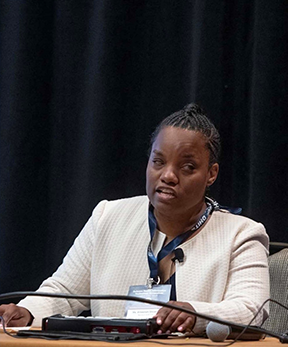 From the Editor: Originally from Chicago, Ameenah Ghoston has been involved with the NFB for more than thirty years. Currently she serves as treasurer of the Fairfax Chapter of the NFB of Virginia. She is a mentor for the Project RISE program and a facilitator for the Virginia affiliate’s Journeys Through Blindness Program. She holds a BA from the University of Illinois/Urbana-Champaign and a Master’s of Biblical and Theological Studies from Dallas Theological Seminary. She oversees the management and implementation of Section 508 of the Rehabilitation Act for the Defense Health Agency. The first blind person to complete the Federal Chief Information Officer Certification at the National Defense University, she is the 2019 recipient of the Department of Defense’s Disability Award.
Between my personal life and my professional life, I use a lot of assistive technology. I have two iPhones, two laptops, and a variety of Braille displays, including two notetaking devices. Depending on what I need to accomplish, I frequently switch between these devices throughout my day. For example, before my workday begins, I may check the weather, read my email, read the news, and review my personal schedule. Then I might communicate with friends and family and look up the transit schedule for my commute to work. I perform all of these tasks and operations using either my laptop with JAWS or my personal cellphone with VoiceOver enabled. VoiceOver provides nonvisual access to the Apple iOS family of devices, and the JAWS program provides nonvisual access to Windows.
Yet, even with an array of technology solutions at my fingertips, I regularly use low-tech tools to perform a myriad of tasks at home, in the workplace, or in academic settings.
I believe there are four essential skills that blind students and professionals should master, in the event that their technology is for any reason unavailable to them or is not adequate for the task at hand. These low-tech skills are knowing how to use a slate and stylus, how to work with a human reader, how to type on a qwerty keyboard, and how to use memorization techniques.
The slate and stylus is equivalent to pen and paper for a print reader, but it is used for writing Braille. No matter where I go, I always carry a slate and stylus with me. I learned to use a slate and stylus when I was in elementary school. While I was in high school and college in the 1990s, I used this tool extensively for taking notes. At that time Braille notetaking devices were limited in what they could do, and they did not connect with standard computing devices—that development didn’t come until the early 2000s. Furthermore, laptops were not widely used by students, and nearly everyone used pen and paper for taking notes.
The ability to use a slate and stylus has served me well throughout the course of my career. For example, when I prepare for a public-speaking engagement, I create my speaking notes using a slate and stylus to write on five- by seven-inch notecards. If I’m giving a PowerPoint slide deck presentation, each card corresponds to a particular slide. When I flip from one card to the next, I nonverbally communicate to my human reader/assistant that it’s time to advance to the next slide.
I find that there are many benefits to reading a presentation from notecards instead of using a computing device. Reading from Braille notecards allows me to be present and engaged with my audience, considered “best practices” for effective public speaking and communications. When I’m not depending on a laptop or some other electronic device, I can look in the direction of my audience, use gestures, and move freely around the meeting space.
Knowing how to work with a human reader is another skill that a blind person should hone.
A human reader or visual interpreter is someone who provides assistance with completing tasks when technology is inaccessible or when it is more efficient to work with a person rather than with a machine. Like any other professional, readers should be compensated for their services. Just because someone has vision, that does not automatically qualify them to serve as a human reader/visual interpreter. As we work together, I train my readers to find the material I need, skip extraneous details, spell unfamiliar names, and explain charts and graphs.
I began to rely on readers extensively when I attended college in the late 1990s/early 2000s. I used readers for reading textbooks that weren’t available from Learning Ally, and readers assisted me with researching and proofreading papers. At that time textbooks for blind students were recorded on cassette tapes or compact discs, and they were not available in an electronic format. If I needed a book for a class, my options were either to perform Optical Character Recognition (OCR) scanning myself or to work with a human reader, who would literally read the book for me, either live in person or onto a cassette tape.
In the workplace today, I use a human reader when I need to create presentations. A reader can ensure that my presentations are visually appealing and conform to organizational branding standards. I also use a reader in situations where a document or application is inaccessible. A human reader allows me to complete tasks efficiently; I don’t waste time struggling to get something done when applications are inaccessible. While there is legal recourse for filing digital accessibility complaints under the Americans with Disabilities Act, one has to weigh the pros and cons of doing so. Regardless of the option pursued, the work still needs to get done. Working with a reader is one method for achieving that goal. It is important that a blind student cultivates strategies for working with a human reader for academic and professional success.
Another critical skill for blind students and professionals is memorization.
Memorization is a learned skill that must be developed intentionally. I began learning how to memorize things early in my childhood, starting with learning the Braille code. I have fond memories of learning each Braille symbol with my mother through flashcards or by reading aloud to her using Twin Vision books. I also memorized music selections for my piano lessons. I learned to memorize words through poetry recitation. I would memorize the layout of physical spaces that I frequented: the school building, my classroom, a relative’s home. When I became a teenager, my parents permitted me to travel independently to and from school so I could participate in extracurricular activities. I memorized the names of major streets in Chicago, how to travel to my home by car and public transit—something my orientation and mobility (O&M) instructor had encouraged me to do.
Around that same time I was introduced to the Braille ‘n Speak, one of the earliest models of a Braille notetaking device. Learning to use it entailed memorizing the sequence of keys and steps for navigating the device and inputting information. But while the Braille ‘n Speak did make notetaking convenient, I still preferred reading Braille and taking notes with my slate and stylus rather than listening to a machine read to me. I never used the device for submitting homework. For homework assignments I would work with a reader who usually was my TVI (teacher of the visually impaired.) Sometimes I would type out homework assignments myself from the notes I had recorded in Braille or on my Braille ‘n Speak. The memorization that I had learned through the Braille ‘n Speak prepared me for learning how to use screen reading technology. Specifically, JAWS for Windows and the computer. But what made transitioning to the computer easier for me was that I already knew how to touch type on a qwerty keyboard.
My teachers taught me to type when I was ten years old—not on an electric typewriter, but on a manual one. For an hour each day we students were introduced to the letters and numbers of the typewriter keyboard. Once we became comfortable with typing individual letters and numbers, we were introduced to typing words and sentences. Finally, we worked on increasing our speed and typing without errors. By the time I entered sixth grade, I was required to type all of my language arts assignments for final submission to my instructors. And so, while most students today learn how to type in conjunction with learning how to use a computer and screen reader, I learned how to type apart from those technologies—a skill that has served me well.
As a society today we are growing accustomed to the convenience of dictation, and many blind students use dictation for capturing information on their cellphones. However, dictation currently is not allowed in the workplace. Therefore, blind students should be comfortable typing on a qwerty keyboard and should have a high level of proficiency.
It is important that students can switch to low-tech solutions for completing tasks. Typing on a qwerty keyboard, memorization, working with a human reader, and using a slate and stylus—learning and developing proficiency with these low-tech approaches prepares blind students for those times when their standard array of technologies is unavailable to them or is inefficient for the task at hand.
Blind students today have access to an amazing array of technology—voice dictation, cellphones, and Bluetooth-connected devices. They can store information in the cloud, access web-based applications, and call upon generative AI. However, many academic and workplace organizations limit the use of such technologies by all employees. I for one have worked, and still do work in these restrictive environments. Furthermore, reasonable accommodation requests to access or use these technologies are typically denied.
Blind students should have the skills to learn new technologies in order to adapt and advance in their academic studies and eventual careers. However, there are instances when our technology fails us all, sighted and blind alike. While it is impossible to prepare for every situation, I believe that it is essential that blind students know how to use alternative techniques for when their arsenal of technology isn’t the answer.